

Old webcam videos could not play until....
....they were converted to a usable format. But the video files have the .AWLive extension which is not supported by any of the software I have on my Linux machine.
Converting old proprietary video format
Years ago I had a webcam that recorded video in a proprietary format with the .AWLive filename extension. I don't ever want to do that again. For now on, I will use open video formats. These videos will not play unless the old purchased software is used. And I could not edit the videos, either.
It looked impossible to convert the videos to an usable format, like mp4. But I still had the original program installed on the old Windows XP machine. With the help of AI and after prayer to God, I was able to generate a batch file script that converts an entire folder of videos to the .avi format, which I can edit and render in open-source video editors, like Kdenlive on Linux.
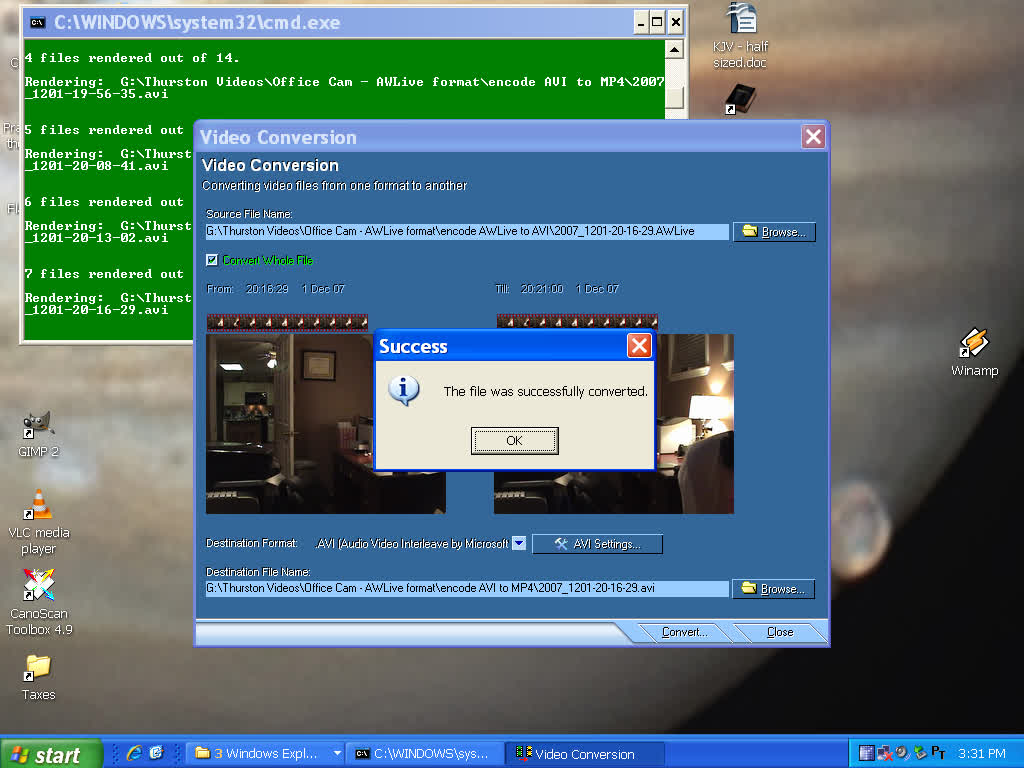
In case anyone else would like to use similar code, I will include it with this post. Also, it might give you ideas how you could use free AI as a tool to generate custom-made code for your own uses.
It is satisfying to see old hardware doing something useful. During this project I was reminded that everything is made with words. The code is just words in an ordered syntax that causes the computer to render videos. And God made everything with words, including our physical bodies, which have a genetic code.
Converting old proprietary video format
Years ago I had a webcam that recorded video in a proprietary format with the .AWLive filename extension. I don't ever want to do that again. For now on, I will use open video formats. These videos will not play unless the old purchased software is used. And I could not edit the videos, either.
It looked impossible to convert the videos to an usable format, like mp4. But I still had the original program installed on the old Windows XP machine. With the help of AI and after prayer to God, I was able to generate a batch file script that converts an entire folder of videos to the .avi format, which I can edit and render in open-source video editors, like Kdenlive on Linux.
In case anyone else would like to use similar code, I will include it with this post. Also, it might give you ideas how you could use free AI as a tool to generate custom-made code for your own uses.
:: Convert folder of AWLive video format to AVI.  Before running, you just need to specify the source directory and the render directory.
:: Place this script into the directory where you have AWlive installed.  In my case it was C:\Program Files\Active WebCam.
:: And run it from there.  A double-click on the file will start it.
:: Sep-10-2025

@echo off
color 2F
:: Enable delayed variable expansion
setlocal enabledelayedexpansion

:: Set the source directory here
set "sourceDir=G:\Videos\encode AWLive to AVI"

:: Set the render directory here
set "renderDir=G:\Videos\AVI"

:: Initialize the rendered files counter
set /a renderedCount=0

:: Count the total number of .AWLive files in the source directory
set /a totalFiles=0
for %%G in ("%sourceDir%\*.AWLive") do (
    set /a totalFiles+=1
)
echo !totalFiles! total files to render
pause

:: Check if the render directory exists
if not exist "!renderDir!" (
    echo Output directory does not exist.
    echo Please create the directory and try again.
    pause
    exit /b
)

:: Loop through each .AWLive file in the source directory

for %%F in ("%sourceDir%\*.AWLive") do (
    :: Debugging: Print the filename
    set filename=%%~nF
    echo.
    echo Rendering:  %renderDir%\!filename!.avi
    echo.

    if exist "%renderDir%\!filename!.avi" (
	echo File already exists: "%renderDir%\!filename!.avi". Skipping...
    )

    if not exist "%renderDir%\!filename!.avi" (
	color 2F
        :: Call conversion program
        ImageConvert.exe "%sourceDir%\!filename!.AWLive" "%renderDir%\!filename!.avi" 3
    )

    :: Increment counter
    set /a renderedCount+=1

    :: Show progress
    echo.
    echo !renderedCount! files rendered out of !totalFiles!.

)

color 3F
:: Print a message indicating that the conversion process is finished
echo.
echo All files in folder rendered!

:: Wait for the user to press a key before closing the command prompt window
pause
It is satisfying to see old hardware doing something useful. During this project I was reminded that everything is made with words. The code is just words in an ordered syntax that causes the computer to render videos. And God made everything with words, including our physical bodies, which have a genetic code.
John 1:1-3 KJV | In the beginning was the Word, and the Word was with God, and the Word was God. The same was in the beginning with God. All things were made by him; and without him was not any thing made that was made.
Sep 10, 2025, 9:23:11 AM | by Admin